Carrier-Grade NAT Configuration
Configuration Hierarchy
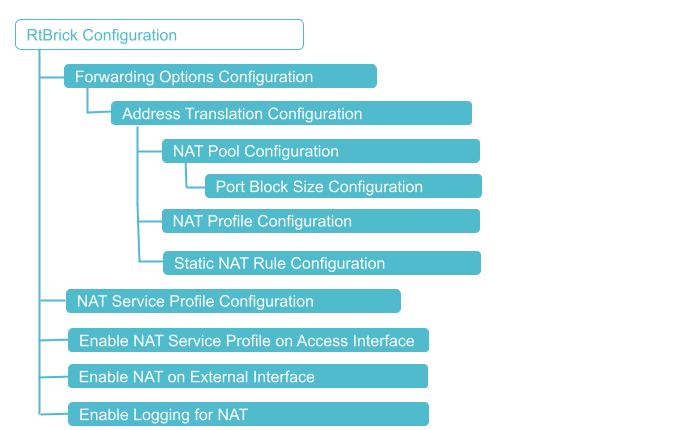
Prerequisites
Before configuring CGNAT, ensure that the appropriate platform profile is configured on the device. The platform profile determines the operating mode of the system and enables the required hardware resources for NAT functionality.
Configure one of the following platform profiles based on the deployment type:
-
Use
nat_1qornat_4qprofile when the system operates as a RBFS CGNAT, where NAT is integrated with subscriber management. -
Use this
nat_standaloneprofile when the system operates as a dedicated CGNAT appliance without BNG subscriber functionality.
The platform profile must be configured and the RBFS container to be rebooted before proceeding with the CGNAT configuration.
Reboot the RBFS container for the changes to take effect, after setting the platform profile. For information about Platform Profile configuration, see Platform Profile.
CGNAT Configuration
You must perform the following tasks to configure CGNAT.
-
Configure NAT Pool
-
Configure NAT Profile
-
Configure NAT Rule
-
NAT Service Profile Configuration
-
Enable NAT on an Instance
-
Enable NAT Service Profile on Access Interface
-
Enable NAT on External Interface
-
Enable Logging for NAT
Configuration Syntax and Commands
The following sections describe the CGNAT configuration syntax and commands.
Configuring NAT Profile
A NAT profile defines how the NAT device has to perform the IPv4 address translation. NAT profile allows you to define an instance, IPv4 address pools, maximum number of translations, and mapping a particular internal IPv4 address with a particular external IPv4 address for a deterministic address translation.
A single NAT profile can be attached to subscribers across different instances. This means that regardless of which instance a subscriber belongs to, they can share the same NAT profile. For example, subscribers in different routing instances can be managed using the same NAT settings.
Subscribers within the same instance can be assigned different NAT profiles. Different groups of subscribers or services within the same instance can have tailored NAT configurations.
| The configuration limit of NAT rules per subscriber in NAT profile is 16,384. |
Syntax:
| Attribute | Description |
|---|---|
|
Specify the NAT profile name. |
|
Specify deterministic as true to enable deterministic NAT for the profile. Deterministic NAT allows subscribers always to connect with a single public IP. |
|
Specify the protocol: tcp, udp, or other. |
|
Specify the ageing time value for the protocol. Default, 300 seconds for TCP and UDP. The allowed Ageing Time Out range values are as follows: |
|
Specify the TCP/UDP control plane ageing timeout value. The default values are as follows: TCP-control-plane: 10 seconds The allowed Ageing Time Out range values are as follows: TCP Control-plane: 5 - 120 |
|
Specify the maximum number of rules per subscriber or an interface. The supported values for maximum address translation per subscriber or an interface are 64, 128, 256, 512, 1024, 2048, 4096, 8192, and 16384. |
|
Specify the name of the public IP address pool. |
The following commands configure the NAT profile named nat_profile1. The nat profile nat_profile1 is configured on the instanced vrf1 with a pool attached nataddr_pool1. Maximum rules are configured as 128 rules and the aging period is configured as 600 seconds for TCP traffic, 300 seconds for UDP traffic, and 300 for 'other' traffic.
set forwarding-options address-translation profile nat_profile1
set forwarding-options address-translation profile nat_profile1 pool nataddr_pool1
set forwarding-options address-translation profile nat_profile1 max-rules 128
set forwarding-options address-translation profile nat_profile1 ip-protocol tcp ageing-timeout 600
set forwarding-options address-translation profile nat_profile1 ip-protocol udp ageing-timeout 300
set forwarding-options address-translation profile nat_profile1 ip-protocol other ageing-timeout 300
Example Configuration:
supervisor@rtbrick>cbng1.rtbrick.net: cfg> show config forwarding-options address-translation profile
{
  "rtbrick-config:profile": [
    {
      "profile": "nat_profile1",
      "pool": "nataddr_pool1",
      "max-rules": "128",
      "ip-protocol": {
        "tcp": {
          "ageing-timeout": 600
        },
        "udp": {
          "ageing-timeout": 300
        },
        "other": {
          "ageing-timeout": 300
        }
      }
    }
  ]
}
NAT Pool Configuration
A NAT IP address pool includes a set of public IPv4 addresses that are used for network address translation. You can create multiple public IPv4 address pools and one pool includes a range of public IPv4 addresses. These pools allocate public IPv4 addresses to subscribers during address translation. While configuring a pool, you can define the group of public IPv4 addresses belonging to that pool by specifying the lowest and highest IP addresses.
The system allows you to create multiple pools and define the association among them. You can define the 'next-pool-name' that takes over when the current pool gets exhausted with the IPv4 addresses. When one pool gets exhausted, the next pool takes over and starts serving the IP addresses to subscribers when the address translation occurs.
| Static and dynamic IP pools cannot be configured simultaneously; they are mutually exclusive. |
Syntax:
| Attribute | Description |
|---|---|
|
Specify the name of the address pool. |
|
Specify both the highest and lowest IPv4 addresses in the range of IPv4 addresses for the pool. |
|
Specify the highest IPv4 address in the address pool. You must specify the highest IP address in the range of IP addresses. |
|
Specify the lowest IPv4 address in the address pool. You must specify the lowest IP address in the range of IP addresses. |
|
Specify the name of the next address pool that is to be used when the current address pool is allocated completely. |
Example Configuration:
The following commands configure nataddr_pool1 as the NAT pool and nataddr_pool2 as the next pool.
It indicates NAT pool nataddr_pool1 contains a range of public IPv4 addresses from 198.51.100.1 to 198.51.100.5.
When the pool nataddr_pool1 has fully allocated its IPv4 addresses, the next pool named nataddr_pool2 will start allocating IPv4 addresses from its pool. The pool nataddr_pool2 includes a rage of IPv4 address from 192.0.2.1 to 192.0.2.150.
set forwarding-options address-translation pool nataddr_pool1
set forwarding-options address-translation pool nataddr_pool1 next-pool-name nataddr_pool2
set forwarding-options address-translation pool nataddr_pool1 ipv4-address low 198.51.100.1
set forwarding-options address-translation pool nataddr_pool1 ipv4-address high 198.51.100.5
set forwarding-options address-translation pool nataddr_pool2 ipv4-address low 192.0.2.1
set forwarding-options address-translation pool nataddr_pool2 ipv4-address high 192.0.2.150
Example Configuration:
supervisor@rtbrick: cfg> show config forwarding-options address-translation pool
{
  "rtbrick-config:pool": [
    {
      "pool-name": "nataddr_pool1",
      "next-pool-name": "nataddr_pool2",
      "ipv4-address": {
        "low": "198.51.100.1",
        "high": "198.51.100.5"
      }
    },
    {
      "pool-name": "nataddr_pool2",
      "ipv4-address": {
        "low": "192.0.2.1",
        "high": "192.0.2.150"
      }
    }
  ]
}
NAT Rule Configuration
You can define NAT rules only for static NAT. A NAT rule defines a match condition and a corresponding action. After you specify NAT rules, each packet is matched with each NAT rule. If a packet matches the condition specified in a rule, then the action corresponding to that match occurs. Match rules govern how the translation of private IPv4 addresses to public IPv4 addresses is performed.
With NAT rules, you can define how address translation is applied to traffic, and how to handle various protocols and data traffic, such as TCP and UDP, to ensure proper address translation and the mappings of private addresses to public addresses.
Rules also define how to handle inbound and outbound traffic, different protocols, and data traffic such as TCP and UDP for ensuring the proper address translation of traffic.
| Configuration limit for NAT maximum rules per subscriber is 16,384. |
Syntax:
| Attribute | Description |
|---|---|
|
Specify the name of the rule. |
|
Specify the ordinal value. An ordinal value is a numerical representation that indicates its relative position or order. |
|
Specify the RBFS instance name. |
|
Specify the IP protocol, TCP or UDP. |
|
Specify the private IPv4 address or port number that needs to be translated. |
|
Specify the public IPv4 address. This public IP will be mapped with the private IP in the translation table. |
Configuring NAT Service Profile
You must create a NAT service profile and attach the service profile with the access interface for enabling CGNAT on the interface.
Syntax:
| Attribute | Description |
|---|---|
|
Name of the service profile. |
|
Specify the profile name for the address translation. |
The following configuration defines a service profile named nat_service. It associates the NAT profile named 'nat_profile1' to the 'nat_service' profile. It indicates any subscriber using this service profile will use the configuration defined in nat_profile1.
set access service-profile nat_service
set access service-profile nat_service address-translation profile nat_profile1
Example:
{
  "rtbrick-config:service-profile": [
    {
      "profile-name": "nat_service",
      "address-translation": {
        "profile": "nat_profile1"
      },
      "qos": {
        "profile": "qos_profile1"
      }
    }
  ]
}
Enable NAT Service Profile on the Access Interface
The NAT service profile can be assigned either dynamically via RADIUS or statically through the access interface configuration, as shown below.
Syntax:
| Attribute | Description |
|---|---|
|
Configure global service profile. |
|
Specify the minimum number of outer VLANs. Allowed range: 1 - 4094. |
|
Specify the maximum number of outer VLANs. Allowed range 1 - 4094. |
|
Specify the minimum number of inner VLANs. Allowed range: 1 - 4094. |
|
Specify the maximum number of inner VLANs. Allowed range 1 - 4094. |
|
Specify the name of the service profile. |
The following commands attach service profile nat_service to the interface (double-tagged) ifp-0/0/17. The configuration shows the range of outer VLANs as 1000 - 1007, and the range inner VLANs as 84 - 4084. The access type configured is IPoE and the service profile is NAT service. AAA profile name is ipoe-aaa and the gateway IFL is lo-0/0/0/100.
IPoE subscriber with outer VLAN between 1000 and 1007, and inner VLAN between 84 and 4084 will be matched with this NAT service profile and a corresponding action will be taken. Anything outside these vlans will not have any action from this NAT service profile.
set access interface double-tagged ifp-0/0/17 1000 1007 84 4084
set access interface double-tagged ifp-0/0/17 1000 1007 84 4084 access-type IPoE
set access interface double-tagged ifp-0/0/17 1000 1007 84 4084 access-profile-name ipoe
set access interface double-tagged ifp-0/0/17 1000 1007 84 4084 service-profile-name nat_service
set access interface double-tagged ifp-0/0/17 1000 1007 84 4084 aaa-profile-name ipoe-aaa
set access interface double-tagged ifp-0/0/17 1000 1007 84 4084 gateway-ifl lo-0/0/0/100
{
  "rtbrick-config:interface": {
    "double-tagged": [
      {
        "interface-name": "ifp-0/0/17",
        "outer-vlan-min": 1000,
        "outer-vlan-max": 1007,
        "inner-vlan-min": 84,
        "inner-vlan-max": 4084,
        "access-type": "IPoE",
        "access-profile-name": "ipoe",
        "service-profile-name": "nat_service",
        "aaa-profile-name": "ipoe-aaa",
        "gateway-ifl": "lo-0/0/0/100"
      }
    ]
  }
}
The following commands configure a double-tagged interface ifp-0/0/6 and outer VLAN minimum value is 1000, maximum value as 1007, inner VLAN minimum value as 84 and maximum value as 4084. The access type configured is PPPoE, service profile is NAT service. AAA profile name is configured as ipoe-aaa.
It indicates PPPoE subscriber with outer VLAN between 1000 and 1007, and inner VLAN between 84 and 4084 will be matched with this NAT service profile and a corresponding action will be taken. Anything outside these vlans will not have any action from this NAT service profile.
set access interface double-tagged ifp-0/0/16 1000 1007 84 4084
set access interface double-tagged ifp-0/0/16 1000 1007 84 4084 access-type PPPoE
set access interface double-tagged ifp-0/0/16 1000 1007 84 4084 access-profile-name pppoe
set access interface double-tagged ifp-0/0/16 1000 1007 84 4084 service-profile-name nat_service
set access interface double-tagged ifp-0/0/16 1000 1007 84 4084 aaa-profile-name ipoe-aaa
Example:
{
  "rtbrick-config:interface": {
    "double-tagged": [
      {
        "interface-name": "ifp-0/0/16",
        "outer-vlan-min": 1000,
        "outer-vlan-max": 1007,
        "inner-vlan-min": 84,
        "inner-vlan-max": 4084,
        "access-type": "PPPoE",
        "access-profile-name": "pppoe",
        "service-profile-name": "nat_service",
        "aaa-profile-name": "ipoe-aaa"
      },
    ]
  }
}
Enable NAT on an Instance
You can enable address translation for a specific routing instance such as VRF or virtual router rather than globally across the entire router.
Syntax:
| Attribute | Description |
|---|---|
|
Name of the instance. |
The following command is used to enable address translation for the instance named 'vrf1'.
set instance vrf1 address-translation true
supervisor@rtbrick.net: op> show config instance vrf1 address-translation
{
  "rtbrick-config:address-translation": "true"
}
Enable NAT on External Interface
It is required to enable the NAT on the external (core-facing) interface.
Syntax:
| Attribute | Description |
|---|---|
|
Name of the interface. |
|
Configure the number of sub-interfaces under the physical interface. |
|
Specify 'public' for the external interface. |
The following commands configure the external interface ifp-0/1/64 for IPv4 address translation. 'Unit' logical identifier for this physical interface. Direction 'public' shows the configuration on external interface for address translation.
set interface ifp-0/1/64 unit 100
set interface ifp-0/1/64 unit 100 address-translation
set interface ifp-0/1/64 unit 100 address-translation direction public
supervisor@rtbrick.net: cfg> show config interface ifp-0/1/64 unit 100
{
  "rtbrick-config:unit": [
    {
      "unit-id": 100,
      "address-translation": {
        "direction": "public"
      }
    }
  ]
}
Enable Logging for NAT
You can optionally enable logging for CGNAT operations.
| All RBFS logs and related information is available in the RBFS Logging User Guide. For the list of RBFS logs, see Log Reference. |
| Attribute | Description |
|---|---|
|
Specify the log level. |
|
Specify the log module. |
|
Specify the plugin-alias URL. Plugin-alias is an external logging host server to which you can export logs. For example, Graylog. |
The following commands configure logging for NAT module natd with a log level 'debug'.
set log bd natd
set log bd natd module nat
set log bd natd module nat level debug
supervisor@rtbrick.net: cfg> show config log bd natd
{
  "rtbrick-config:bd": [
    {
      "bd-name": "natd",
      "module": [
        {
          "module-name": "nat",
          "level": "debug"
        }
      ]
    }
  ]
}
Modifying the Policer on NAT Trap
You can modify the 'policer' associated with NAT traps, which directs certain packets to the control plane (hostpath). A NAT trap indicates when a device is performing network address translation, some packets that require special handling, are diverted to the control plane for processing.
To change the policer for NAT traps, use the following command:
Syntax:
| Attribute | Description |
|---|---|
|
Specify the name of the policer. |
Example for modifying the policer for NAT trap.
set forwarding-options address-translation trap policer _DEFAULT_POLICER_5_MB
Selective NAT Bypass
The following example shows how to bypass NAT for public-IP subscribers using dynamic subscriber filters.
For IPoE subscribers, matching traffic directly on the incoming logical interface (subscriber-ifl) is not supported. Instead, the system internally translates the match subscriber-ifl to source IPv4 address. As a result, unlike PPPoE—where framed-routes are automatically covered, this dynamic rule does not cover framed-routes for IPoE subscribers. Therefore, deploying IPoE alongside framed routes requires configuring additional static ACL rules to explicitly bypass NAT for traffic originating from those routes.
The following example demonstrates how to bypass NAT using static ACL rules that match against public IP address pools. This static approach can be used in conjunction with dynamic subscriber ACLs (for instance, to cover framed-route traffic), or it can be used entirely instead of subscriber ACLs to conserve hardware ACL resources.
set forwarding-options acl l3v4 rule NO_NAT
set forwarding-options acl l3v4 rule NO_NAT ordinal 1000
set forwarding-options acl l3v4 rule NO_NAT ordinal 1000 match direction ingress
set forwarding-options acl l3v4 rule NO_NAT ordinal 1000 match source-ipv4-prefix-list PUBLIC
set forwarding-options acl l3v4 rule NO_NAT ordinal 1000 action trap default
set forwarding-options acl l3v4 rule NO_NAT ordinal 1000 acpriority 1000

set forwarding-options prefix-list PUBLIC
set forwarding-options prefix-list PUBLIC ipv4-prefix 192.0.2.0/24
set forwarding-options prefix-list PUBLIC ipv4-prefix 198.51.100.0/24
Selective NAT Bypass Using Destination Prefix
RBFS CGNAT allows selective bypass of Network Address Translation based on destination IPv4 prefixes using static ACL rules. Traffic matching the configured prefix in the specified direction is excluded from address translation. This feature enables you to preserve original source and destination addresses for specific destinations to be reached remaining the private IP address.
Syntax
The following configuration defines a rule named 'exclude_nat' with an ingress match condition. The rule matches traffic destined to the 10.10.10.1/24 prefix and assigns it a priority of 500 for processing order. Matching packets are trapped to the default control-plane handler, allowing the system to process them separately for excluding them from NAT handling.
set forwarding-options acl l3v4 rule EXCLUDE_NAT
set forwarding-options acl l3v4 rule EXCLUDE_NAT ordinal 1
set forwarding-options acl l3v4 rule EXCLUDE_NAT ordinal 1 match destination-ipv4-prefix 10.10.10.1/24
set forwarding-options acl l3v4 rule EXCLUDE_NAT ordinal 1 match direction ingress
set forwarding-options acl l3v4 rule EXCLUDE_NAT ordinal 1 action trap default
set forwarding-options acl l3v4 rule EXCLUDE_NAT ordinal 1 priority 500