Self-Service Portal Sign-Up / Sign-In
RtBrick customers use the self-service portal to request access to the RBFS image download servers and request RBFS licenses. Every user of the Self-Service portal is associated with a specific organization, which is determined by the domain of their company email address. For example, all users with an email address under the domain @rtbrick.com are affiliated with RtBrick. If your email domain is not registered with RtBrick, contact RtBrick Support for assistance.
RtBrick supports a single sign-on (SSO) mechanism that authenticates users across Freshdesk, Self-Service Portal, and auth.rtbrick.com identity management system, forming a unified SSO domain. All users with access to RtBrick services are managed centrally within auth.rtbrick.com.
RtBrick Authentication Method
RtBrick provides its own authentication service with RtBrick Identity Management System through auth.rtbrick.com, allowing you to sign in to the Self-Service Portal using their RtBrick account.
To sign in using an RtBrick account:
-
Open the Self-Service Portal.
-
Select Sign in with RtBrick (or enter RtBrick credentials when prompted). You are redirected to
auth.rtbrick.comfor authentication. -
Enter the RtBrick email address and password. After successful authentication, you are redirected back to the Self-Service Portal.
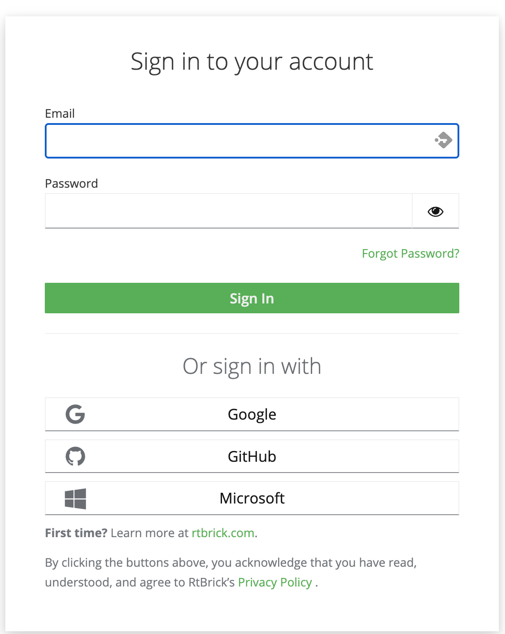
If you do not already have a RtBrick account, click Sign Up on the authentication page and complete the registration process before signing in.
Third Party Authentication Methods
In addition, RtBrick supports third party authentication services. The Self-Service portal uses OpenID/Connect to delegate user authentication to third-party authorization services. These authorization services ensure the secure storage of user credentials and provide additional security measures, including two-factor authentication and account recovery options for users who may have forgotten their passwords.
If you do not have an account with any of the three supported third-party authorization services, create an account with RtBrick’s identity management system using auth.rtbrick.com.
|
The portal supports the following authentication service providers:
-
GitHub
-
Google
-
Microsoft
Selecting Google, GitHub, or Microsoft redirects you to the respective third-party provider to authenticate the credentials.
When a user logs into the portal for the first time, their membership is created. The member will be assigned to an organization based on the domain of their email address. This domain must be a trusted domain, meaning it should be listed in the trusted domains list of exactly one organization.
| Attempts to sign up / sign in to the portal with an email address of an untrusted domain will be rejected. |
GitHub
GitHub allows users to create new accounts for free. A user must declare their company email address as the public email in their GitHub profile to enable the portal to read the email address during the OpenID/Connect authentication process.
| A user cannot sign up / sign in to the portal if the portal is not allowed to read the user’s email address. |
The user must confirm that the portal has permission to access the email address from their user profile for the sign-up process. After the initial sign-up, subsequent logins will not require the user to grant access to their profile again.
Microsoft
Microsoft allows domain administrators to decide which sites can delegate authentication to the Microsoft’s OpenID/Connect authorization services. This adds an additional level of security, because a user can not accidentally share profile data with an untrusted site.
A user will only be prompted for granting the portal access to its profile if the domain administrator has allowed the portal to delegate the login to Microsoft for its organization. In case the portal is not allowed to delegate authentication to Microsoft for the paritcular organization, the user attempting to sign-up to the portal will be prompted to request a domain administrator to grant the portal access to Microsoft authentication services.
In large enterprises with strict security processes granting the portal access to Microsoft authentication service might take a considerable amount of time. An alternative would be to create a GitHub account.
Using the Self-Service Portal
The Self-Service Portal can be used for generating and uploading client certificates. Also, it is required for obtaining new RBFS licenses or extend the existing licenses. For more information, see the Uploading the Certificate to the Self-Service Portal section of the RBFS Image Download Guide and Managing Licenses via Self-Service Portal section of the RBFS Licensing Guide.