LLDP Configuration
Configuration Hierarchy
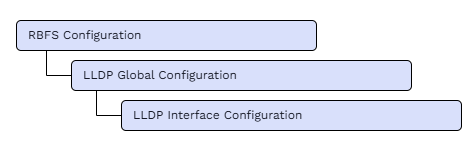
The diagram illustrates the LLDP configuration hierarchy.
Configuration Syntax and Commands
The following sections describe the LLDP configuration syntax and commands.
LLDP Global Configuration
This configuration enables or disables LLDP globally and defines the default LLDP parameters advertised by the system. You can configure the system description, system name, transmit hold time, and packet transmission interval. These settings provide the default LLDP behavior for the device unless overridden by interface-level configuration.
Syntax:
The following table provides command options and description.
| Attribute | Description |
|---|---|
|
Enables or disables LLDP globally. LLDP is enabled by default. |
|
Specifies the system description advertised to LLDP neighbors. |
|
Specifies the system name advertised to LLDP neighbors. If not configured, the system name is retrieved from BDS. |
|
Specifies the time, in seconds, for which an LLDP neighbor retains the local device information before aging it out. If no LLDP packet is received before the hold time expires, the neighbor information is aged out and the neighbor is marked as DOWN. The default value is 120 seconds. The range is 1 through 360000 seconds. |
|
Specifies the interval, in seconds, between successive LLDP packet transmissions to neighbors. The default value is 30 seconds. The range is 1 through 3600 seconds. |
Example:
This configuration enables LLDP globally with the system name as 'rtbrick' and the system description as 'rtbrick system'. It configures LLDP packets to be transmitted every 40 seconds and specifies a transmit hold time of 150 seconds.
set lldp admin-status enable
set lldp system-name rtbrick
set lldp system-description rtbrick system
set lldp tx-interval 40
set lldp tx-hold 150
{
    "rtbrick-config:lldp": {
      "admin-status": "enable",
      "system-name": "rtbrick",
      "system-description": "rtbrick system",
      "tx-interval": 40,
      "tx-hold": 150
    }
  }
 To access the RESTCONF API that corresponds to this CLI, click
include::common:partial$restconf_api_links.adoc[tag=set-lldp].
To access the RESTCONF API that corresponds to this CLI, click
include::common:partial$restconf_api_links.adoc[tag=set-lldp].
LLDP Interface Configuration
This configuration controls LLDP behavior on individual interfaces. You can enable or disable LLDP and configure the port description advertised to LLDP neighbors. Interface-level LLDP configuration takes precedence over the corresponding global LLDP administrative status.
Syntax:
The following table provides command options and description.
| Keyword/Parameter | Description | ||
|---|---|---|---|
|
Specifies the interface on which LLDP is enabled or disabled. LLDP is enabled on interfaces by default.
|
||
|
Enables or disables LLDP on the interface. LLDP is enabled by default. Use |
||
|
Specifies the port description advertised to LLDP neighbors. If no port description is configured, the interface description retrieved from IFMD is used as the LLDP port description. |
Example:
This configuration enables LLDP on the 'ifp-0/0/1' interface and defines its port description as 'port ifp-0/0/1'. The configured port description is advertised to the LLDP neighbor through LLDP packets.
set lldp interface ifp-0/0/1
set lldp interface ifp-0/0/1 port-description "port ifp-0/0/1"
set lldp interface ifp-0/0/1 admin-status enable
{
    "rtbrick-config:lldp": {
      "interface": [
        {
          "interface-name": "ifp-0/0/1",
          "port-description": "port ifp-0/0/1",
          "admin-status": "enable"
        }
      ]
    }
  }
To access the RESTCONF API that corresponds to this CLI, click
include::common:partial$restconf_api_links.adoc[tag=set-lldp-interface].