IPoE Subscriber Management Configuration
IP-over-Ethernet (IPoE) is an access technology that uses DHCP for IPv4 and DHCPv6 for IPv6 where both protocols are handled in the IPoE daemon (ipoed). IPoE subscribers are identified by IFP, VLANs and client MAC addresses.
The dynamic creation of IPoE subscribers is triggered by DHCPv4 discover or DHCPv6 solicit request from the subscriber. Response is postponed until the subscriber is successfully authenticated using the known authentication methods such as local or RADIUS, however authentication is not mandatory. After the authentication phase, IPv4/IPv6/IPv6-PD address is allocated to the subscriber either from the local pool or from RADIUS.
For IPoE Subscriber Management, the following configurations are mandatory:
-
Access Interface Configuration
-
Access Profile Configuration
-
AAA (Authentication, Authorization and Accounting) Profile Configuration. Based on the authentication requirement, configure any one of the following:
-
Local Authentication
-
Pool Configuration
-
User Profile Configuration
-
-
RADIUS Authentication
-
RADIUS Profile Configuration
-
RADIUS Server Configuration
-
-
This solution section discusses RADIUS authentication.
NOTES:
-
Access interfaces can be configured without VLAN tags (untagged) and with one (single tagged) or two (double tagged) VLAN tags.
-
There can be more than one interface configured for subscriber management and each interface can reference the same profile.
Configuring IPoE Subscriber Management
For detailed information about the subscriber configuration options, see the Subscriber Management Configuration Guide.
-
Configure the access profile
ipoe.
set access access-profile ipoe protocol ra enable true
set access access-profile ipoe protocol ra interval 30
set access access-profile ipoe protocol dhcp enable true
set access access-profile ipoe protocol dhcp lease-time 3600
set access access-profile ipoe protocol dhcpv6 enable true
set access access-profile ipoe protocol dhcpv6 lifetime 3600
commit
The access profile configuration is shown below.
supervisor@rtbrick: op> show config access access-profile
{
  "rtbrick-config:access-profile": [
    {
      "profile-name": "ipoe",
      "protocol": {
        "ra": {
          "enable": "true",
          "interval": 30
        },
        "dhcp": {
          "enable": "true",
          "lease-time": 3600
        },
        "dhcpv6": {
          "enable": "true",
          "lifetime": 3600
        }
      },
      "address-family": {
        "ipv4": {
          "enable": "true"
        },
        "ipv6": {
          "enable": "true"
        }
      }
    }
  ]
}-
Configure the Authentication and Accounting (AAA) profile for
aaa-profile.
set access aaa-profile aaa-profile
set access aaa-profile aaa-profile session-timeout 0
set access aaa-profile aaa-profile idle-timeout 0
set access aaa-profile aaa-profile aaa-radius-profile radius-profile
set access aaa-profile aaa-profile authentication order RADIUS
set access aaa-profile aaa-profile accounting order RADIUS
set access aaa-profile aaa-profile accounting interim-interval 86400
set access aaa-profile aaa-profile accounting ingress accounting-source POLICER
set access aaa-profile aaa-profile accounting egress accounting-source CLASS
commit
The access AAA configuration is shown below.
supervisor@rtbrick: op> show config access aaa-profile
{
  "rtbrick-config:aaa-profile": [
    {
      "profile-name": "aaa-profile",
      "session-timeout": 0,
      "idle-timeout": 0,
      "aaa-radius-profile": "radius-profile",
      "authentication": {
        "order": "RADIUS"
      },
      "accounting": {
        "order": "RADIUS",
        "interim-interval": 86400,
        "ingress": {
          "accounting-source": "POLICER"
        },
        "egress": {
          "accounting-source": "CLASS"
        }
      }
    }
  ]
}-
Configure the access interface. Double-tagged interface is configured in this case as the access interface (
ifp-0/1/23). The interface configuration assigns the access type, access profile, AAA profile, and further optional attributes like service-profile to the specified access interface.
set access interface double-tagged ifp-0/1/23 1001 1100 1001 1100
set access interface double-tagged ifp-0/1/23 1001 1100 1001 1100 access-type IPoE
set access interface double-tagged ifp-0/1/23 1001 1100 1001 1100 access-profile-name ipoe
set access interface double-tagged ifp-0/1/23 1001 1100 1001 1100 service-profile-name qos_service
set access interface double-tagged ifp-0/1/23 1001 1100 1001 1100 aaa-profile-name aaa-profile
set access interface double-tagged ifp-0/1/23 1001 1100 1001 1100 gateway-ifl lo-0/0/1/0
commit
The double-tagged access interface configuration is shown below.
supervisor@rtbrick: op> show config access interface double-tagged
{
  "rtbrick-config:double-tagged": [
    {
      "interface-name": "ifp-0/1/23",
      "outer-vlan-min": 1001,
      "outer-vlan-max": 1100,
      "inner-vlan-min": 1001,
      "inner-vlan-max": 1100,
      "access-type": "IPoE",
      "access-profile-name": "ipoe",
      "service-profile-name": "qos_service",
      "aaa-profile-name": "aaa-profile",
      "gateway-ifl": "lo-0/0/1/0"
    }
  ]
}-
In this solution, we configure AAA authentication and accounting with RADIUS. To use RADIUS authentication and accounting both the RADIUS profile and RADIUS server configurations (see below) must be configured.
-
Configure RADIUS profile
radius-profile.
set access radius-profile radius-profile
set access radius-profile radius-profile nas-ip-address 192.0.2.74
set access radius-profile radius-profile nas-port-format DEFAULT
set access radius-profile radius-profile nas-port-type Ethernet
set access radius-profile radius-profile authentication radius-server-profile-name radius
set access radius-profile radius-profile accounting radius-server-profile-name radius
commit
The RADIUS profile configuration is shown below.
supervisor@rtbrick: op> show config access radius-profile radius-profile
{
  "rtbrick-config:radius-profile": [
    {
      "profile-name": "radius-profile",
      "nas-ip-address": "192.0.2.74",
      "nas-port-format": "DEFAULT",
      "nas-port-type": "Ethernet",
      "authentication": {
        "radius-server-profile-name": [
          "radius"
          ]
      },
      "accounting": {
        "radius-server-profile-name": [
          "radius"
          ]
      }
    }
  ]
}-
Configure the RADIUS server
radius.
set access radius-server radius
set access radius-server radius address 192.0.2.34
set access radius-server radius source-address 192.0.2.74
set access radius-server radius secret-encrypted-text $2b2feb12f730107454b1be6a0f8242b0f
set access radius-server radius routing-instance default
set access radius-server radius rate 300
set access radius-server radius authentication enable true
set access radius-server radius authentication retry 3
set access radius-server radius authentication timeout 5
set access radius-server radius accounting enable true
set access radius-server radius accounting timeout 30
set access radius-server radius coa enable true
commit
The attribute` secret-plain-text` will be converted to secret-encrypted-text in the show command output and value will be hashed.
|
The RADIUS server configuration is shown below.
supervisor@rtbrick: op> show config access radius-server radius
{
  "rtbrick-config:radius-server": [
    {
      "server-name": "radius",
      "address": "192.0.2.34",
      "source-address": "192.0.2.74",
      "secret-encrypted-text": "$2b2feb12f730107454b1be6a0f8242b0f",
      "routing-instance": "default",
      "rate": 300,
      "authentication": {
        "enable": "true",
        "retry": 3,
        "timeout": 5
      },
      "accounting": {
        "enable": "true",
        "timeout": 30
      },
      "coa": {
        "enable": "true"
      }
    }
  ]
}-
Configure the IPv4 and IPv6 access pools.
set access pool poolv4
set access pool poolv4 ipv4-address low 203.0.113.1
set access pool poolv4 ipv4-address high 203.0.113.64
set access pool poolv6
set access pool poolv6 ipv6-prefix low 2001:db8:0:1::/64
set access pool poolv6 ipv6-prefix high 2001:db8:0:2::/64
set access pool poolv6pd
set access pool poolv6pd ipv6-prefix low 2001:db8:0:3::/64
set access pool poolv6pd ipv6-prefix high 2001:db8:0:4::/64
commit
The access pool configuration is shown below.
supervisor@rtbrick: op> show config access pool
{
  "rtbrick-config:pool": [
    {
      "pool-name": "poolv4",
      "ipv4-address": {
        "low": "203.0.113.1",
        "high": "203.0.113.64"
      }
    },
    {
      "pool-name": "poolv6",
      "ipv6-prefix": {
        "low": "2001:db8:0:1::/64",
        "high": "2001:db8:0:2::/64"
      }
    },
    {
      "pool-name": "poolv6pd",
      "ipv6-prefix": {
        "low": "2001:db8:0:3::/64",
        "high": "2001:db8:0:4::/64"
      }
    }
  ]
}
IPoE Quality of Service (QoS) Configuration
| The QoS model explained in this document uses a complex HQoS model with the intent to showcase the complete range of QoS features available in RBFS. However, it may not be needed or desirable for all deployments. In such a case it should be possible to conceive of a simple QoS model as required by simplifying the provided QoS model. |
Following are the steps involved in configuring and verifying IPoE QoS:
-
Configuring service profile to enable QoS on IPoE subscriber
-
Configuring downstream QoS
-
Configuring upstream QoS
-
Configuring QoS remarking
-
Configuring IPoE subscriber accounting for upstream and downstream traffic
-
Configuring IPoE subscribers QoS on BNG Blaster
-
Validating IPoE QoS on BNG Blaster
The figure below shows how QoS is configured for ingress and egress traffic.
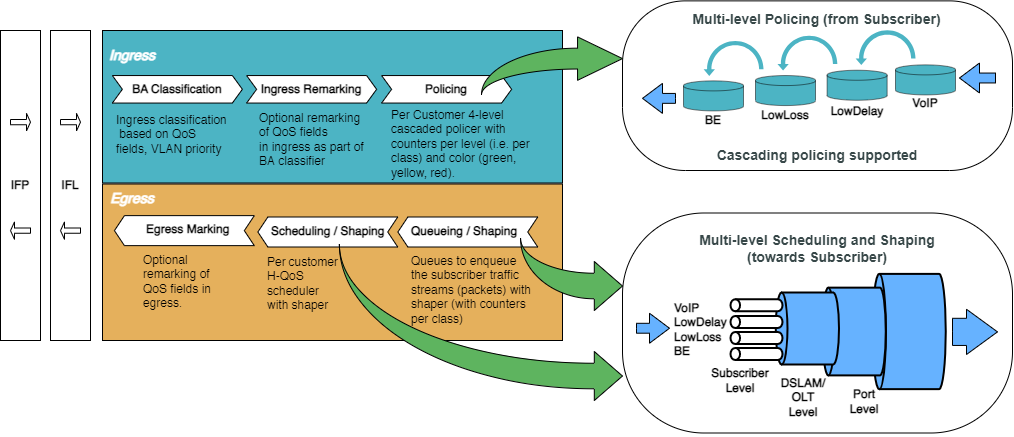
For detailed information about the QoS configuration options, see the HQoS Configuration Guide.
Configure Service Profile
Service profile configuration in subscriber management allows to assign QoS configurations to a subscriber.
-
Configure the service profile to enable QoS. The service profile defined to enable Quality of Service with profile name is
subs-4q-profile.
set access service-profile qos_service qos profile subs-4q-profile
commit
The configuration of the service profile named subs-4q-profile is shown below.
supervisor@rtbrick: op> show config access service-profile qos_service
{
  "rtbrick-config:service-profile": [
    {
      "profile-name": "qos_service",
      "qos": {
        "profile": "subs-4q-profile"
      }
    }
  ]
}-
Enable QoS on IPoE subscriber access interface (
ifp-0/1/23) to enable QoS for IPoE subscriber.
set access interface double-tagged ifp-0/1/23 1001 1100 1001 1100 service-profile-name qos_service
commit
Below is the double-tagged access interface on which the service profile qos_service is configured.
supervisor@rtbrick: op> show config access interface double-tagged
{
  "rtbrick-config:double-tagged": [
    {
      "interface-name": "ifp-0/1/23",
      "outer-vlan-min": 1001,
      "outer-vlan-max": 1100,
      "inner-vlan-min": 1001,
      "inner-vlan-max": 1100,
      "access-type": "IPoE",
      "access-profile-name": "ipoe",
      "service-profile-name": "qos_service",
      "aaa-profile-name": "aaa-profile",
      "gateway-ifl": "lo-0/0/1/0"
    }
  ]
}-
Configure QoS profile to enable on IPoE subscriber.
set forwarding-options class-of-service profile subs-4q-profile
set forwarding-options class-of-service profile subs-4q-profile classifier-name subs-4q-classifier
set forwarding-options class-of-service profile subs-4q-profile class-queue-map-name subs-4q-class-queue
set forwarding-options class-of-service profile subs-4q-profile remark-map-name subs-4q-remark
set forwarding-options class-of-service profile subs-4q-profile class-policer-map-name subs-4q-class-policer
set forwarding-options class-of-service profile subs-4q-profile policer-name subs-4q-policer
set forwarding-options class-of-service profile subs-4q-profile scheduler-map-name subs-4q-scheduler
commit
The QoS Profile with all the primitives needed to enable traffic profiles on IPoE Subscribers is as follows:
supervisor@rtbrick: op> show config forwarding-options class-of-service profile subs-4q-profile
{
  "rtbrick-config:profile": [
    {
      "profile-name": "subs-4q-profile",
      "classifier-name": "subs-4q-classifier",
      "class-queue-map-name": "subs-4q-class-queue",
      "remark-map-name": "subs-4q-remark",
      "class-policer-map-name": "subs-4q-class-policer",
      "policer-name": "subs-4q-policer",
      "scheduler-map-name": "subs-4q-scheduler"
    }
  ]
}
Configure Downstream QoS
Downstream Quality of Service (QoS) is used to prioritize network traffic from the Internet to subscribers.
-
Enable global classification for downstream traffic.
set forwarding-options class-of-service global multifield-classifier-name global_mfc
commit
Below is the multi-field-classifier (MFC) based classifier for global enabling of downstream traffic classification.
supervisor@rtbrick: op> show config forwarding-options class-of-service global multifield-classifier-name
{
  "rtbrick-config:multifield-classifier-name": "global_mfc"
}-
Configure the MFC-based classifier with qualifiers and actions.
set forwarding-options class-of-service multifield-classifier acl
set forwarding-options class-of-service multifield-classifier acl l3v4
set forwarding-options class-of-service multifield-classifier acl l3v4 rule global_mfc
set forwarding-options class-of-service multifield-classifier acl l3v4 rule global_mfc ordinal 1001
set forwarding-options class-of-service multifield-classifier acl l3v4 rule global_mfc ordinal 1001 match
set forwarding-options class-of-service multifield-classifier acl l3v4 rule global_mfc ordinal 1001 match ipv4-tos 128
set forwarding-options class-of-service multifield-classifier acl l3v4 rule global_mfc ordinal 1001 match source-ipv4-prefix 192.0.2.2/32
set forwarding-options class-of-service multifield-classifier acl l3v4 rule global_mfc ordinal 1001 action
set forwarding-options class-of-service multifield-classifier acl l3v4 rule global_mfc ordinal 1001 action forward-class class-0
set forwarding-options class-of-service multifield-classifier acl l3v4 rule global_mfc ordinal 1002
set forwarding-options class-of-service multifield-classifier acl l3v4 rule global_mfc ordinal 1002 match
set forwarding-options class-of-service multifield-classifier acl l3v4 rule global_mfc ordinal 1002 match ipv4-tos 160
set forwarding-options class-of-service multifield-classifier acl l3v4 rule global_mfc ordinal 1002 match source-ipv4-prefix 192.0.2.2/32
set forwarding-options class-of-service multifield-classifier acl l3v4 rule global_mfc ordinal 1002 action
set forwarding-options class-of-service multifield-classifier acl l3v4 rule global_mfc ordinal 1002 action forward-class class-1
set forwarding-options class-of-service multifield-classifier acl l3v4 rule global_mfc ordinal 1003
set forwarding-options class-of-service multifield-classifier acl l3v4 rule global_mfc ordinal 1003 match
set forwarding-options class-of-service multifield-classifier acl l3v4 rule global_mfc ordinal 1003 match ipv4-tos 192
set forwarding-options class-of-service multifield-classifier acl l3v4 rule global_mfc ordinal 1003 match source-ipv4-prefix 192.0.2.2/32
set forwarding-options class-of-service multifield-classifier acl l3v4 rule global_mfc ordinal 1003 action
set forwarding-options class-of-service multifield-classifier acl l3v4 rule global_mfc ordinal 1003 action forward-class class-2
set forwarding-options class-of-service multifield-classifier acl l3v4 rule global_mfc ordinal 1004
set forwarding-options class-of-service multifield-classifier acl l3v4 rule global_mfc ordinal 1004 match
set forwarding-options class-of-service multifield-classifier acl l3v4 rule global_mfc ordinal 1004 match ipv4-tos 224
set forwarding-options class-of-service multifield-classifier acl l3v4 rule global_mfc ordinal 1004 match source-ipv4-prefix 192.0.2.2/32
set forwarding-options class-of-service multifield-classifier acl l3v4 rule global_mfc ordinal 1004 action
set forwarding-options class-of-service multifield-classifier acl l3v4 rule global_mfc ordinal 1004 action forward-class class-3
commit
The configuration of the QoS MFC-based Classifier for classification of downstream traffic from the core towards IPoE Subscriber is shown below.
supervisor@rtbrick: op> show config forwarding-options class-of-service global multifield-classifier-name
{
  "rtbrick-config:multifield-classifier-name": "global_mfc"
}-
Enqueue classified traffic to different queues using class-to-queue mapping.
set forwarding-options class-of-service queue-group subs-4q-class-queue queue-numbers 4
set forwarding-options class-of-service class-queue-map subs-4q-class-queue class class-0
set forwarding-options class-of-service class-queue-map subs-4q-class-queue class class-0 queue-name BE_SUBS
set forwarding-options class-of-service class-queue-map subs-4q-class-queue class class-1
set forwarding-options class-of-service class-queue-map subs-4q-class-queue class class-1 queue-name LD_SUBS
set forwarding-options class-of-service class-queue-map subs-4q-class-queue class class-2
set forwarding-options class-of-service class-queue-map subs-4q-class-queue class class-2 queue-name LL_SUBS
set forwarding-options class-of-service class-queue-map subs-4q-class-queue class class-3
set forwarding-options class-of-service class-queue-map subs-4q-class-queue class class-3 queue-name VO_SUBS
commit
Below is the QoS class-queue mapping configuration:
supervisor@rtbrick: op> show config forwarding-options class-of-service class-queue-map subs-4q-class-queue class
{
  "rtbrick-config:class": [
    {
      "class-type": "class-0",
      "queue-name": "BE_SUBS"
    },
    {
      "class-type": "class-1",
      "queue-name": "LD_SUBS"
    },
    {
      "class-type": "class-2",
      "queue-name": "LL_SUBS"
    },
    {
      "class-type": "class-3",
      "queue-name": "VO_SUBS"
    }
  ]
}-
Configure the queues needed for enqueuing and dequeuing traffic streams.
set forwarding-options class-of-service queue BE_SUBS
set forwarding-options class-of-service queue BE_SUBS queue-size 375000
set forwarding-options class-of-service queue LD_SUBS
set forwarding-options class-of-service queue LD_SUBS queue-size 625000
set forwarding-options class-of-service queue LL_SUBS
set forwarding-options class-of-service queue LL_SUBS queue-size 625000
set forwarding-options class-of-service queue VO_SUBS
set forwarding-options class-of-service queue VO_SUBS queue-size 156250
set forwarding-options class-of-service queue VO_SUBS shaper-name shaper_VO
commit
The queue configuration is shown below.
supervisor@rtbrick: op> show config forwarding-options class-of-service queue
{
  "rtbrick-config:queue": [
    {
      "queue-name": "BE_SUBS",
      "queue-size": 375000
    },
    {
      "queue-name": "LD_SUBS",
      "queue-size": 625000
    },
    {
      "queue-name": "LL_SUBS",
      "queue-size": 625000
    },
    {
      "queue-name": "VO_SUBS",
      "queue-size": 156250,
      "shaper-name": "shaper_VO"
    }
  ]
}-
Configure the scheduler needed by Subscriber/Session scheduler-map and OLT scheduler-map.
set forwarding-options class-of-service scheduler pon0
set forwarding-options class-of-service scheduler pon0 type fair_queueing
set forwarding-options class-of-service scheduler subs-4q-class-queue
set forwarding-options class-of-service scheduler subs-4q-class-queue shaper-name shaper_session
set forwarding-options class-of-service scheduler subs-4q-class-queue type strict_priority
commit
The configuration of the scheduler-map and OLT scheduler-map is shown below.
supervisor@rtbrick: op> show config forwarding-options class-of-service scheduler
{
  "rtbrick-config:scheduler": [
    {
      "scheduler-name": "pon0",
      "type": "fair_queueing"
    },
    {
      "scheduler-name": "subs-4q-class-queue",
      "shaper-name": "shaper_session",
      "type": "strict_priority"
    }
  ]
}-
Configure the session/subscriber scheduler mapping for dequeuing traffic based on scheduler type for each queue:
set forwarding-options class-of-service scheduler-map schedmap-olt
set forwarding-options class-of-service scheduler-map schedmap-olt scheduler-name pon0
set forwarding-options class-of-service scheduler-map schedmap-olt scheduler-name pon0 port-connection scheduler_to_port
set forwarding-options class-of-service scheduler-map subs-4q-scheduler
set forwarding-options class-of-service scheduler-map subs-4q-scheduler queue-group-name subs-4q-class-queue
set forwarding-options class-of-service scheduler-map subs-4q-scheduler queue-group-name subs-4q-class-queue queue-name BE_SUBS
set forwarding-options class-of-service scheduler-map subs-4q-scheduler queue-group-name subs-4q-class-queue queue-name BE_SUBS parent-flow high-flow
set forwarding-options class-of-service scheduler-map subs-4q-scheduler queue-group-name subs-4q-class-queue queue-name BE_SUBS parent-scheduler-name subs-4q-class-queue
set forwarding-options class-of-service scheduler-map subs-4q-scheduler queue-group-name subs-4q-class-queue queue-name BE_SUBS connection-point strict_priority_3
set forwarding-options class-of-service scheduler-map subs-4q-scheduler queue-group-name subs-4q-class-queue queue-name LD_SUBS
set forwarding-options class-of-service scheduler-map subs-4q-scheduler queue-group-name subs-4q-class-queue queue-name LD_SUBS parent-flow high-flow
set forwarding-options class-of-service scheduler-map subs-4q-scheduler queue-group-name subs-4q-class-queue queue-name LD_SUBS parent-scheduler-name subs-4q-class-queue
set forwarding-options class-of-service scheduler-map subs-4q-scheduler queue-group-name subs-4q-class-queue queue-name LD_SUBS connection-point strict_priority_1
set forwarding-options class-of-service scheduler-map subs-4q-scheduler queue-group-name subs-4q-class-queue queue-name LL_SUBS
set forwarding-options class-of-service scheduler-map subs-4q-scheduler queue-group-name subs-4q-class-queue queue-name LL_SUBS parent-flow high-flow
set forwarding-options class-of-service scheduler-map subs-4q-scheduler queue-group-name subs-4q-class-queue queue-name LL_SUBS parent-scheduler-name subs-4q-class-queue
set forwarding-options class-of-service scheduler-map subs-4q-scheduler queue-group-name subs-4q-class-queue queue-name LL_SUBS connection-point strict_priority_2
set forwarding-options class-of-service scheduler-map subs-4q-scheduler queue-group-name subs-4q-class-queue queue-name VO_SUBS
set forwarding-options class-of-service scheduler-map subs-4q-scheduler queue-group-name subs-4q-class-queue queue-name VO_SUBS parent-flow high-flow
set forwarding-options class-of-service scheduler-map subs-4q-scheduler queue-group-name subs-4q-class-queue queue-name VO_SUBS parent-scheduler-name subs-4q-class-queue
set forwarding-options class-of-service scheduler-map subs-4q-scheduler queue-group-name subs-4q-class-queue queue-name VO_SUBS connection-point strict_priority_0
set forwarding-options class-of-service scheduler-map subs-4q-scheduler scheduler-name subs-4q-class-queue
set forwarding-options class-of-service scheduler-map subs-4q-scheduler scheduler-name subs-4q-class-queue port-connection scheduler_to_port
commit
The QoS Subscriber/Session Scheduler-Map configuration is shown below:
supervisor@rtbrick: op> show config forwarding-options class-of-service scheduler-map subs-4q-scheduler
{
  "rtbrick-config:scheduler-map": [
    {
      "scheduler-map-name": "subs-4q-scheduler",
      "queue-group-name": [
        {
          "group-name": "subs-4q-class-queue",
          "queue-name": [
            {
              "name": "BE_SUBS",
              "parent-flow": "high-flow",
              "parent-scheduler-name": "subs-4q-class-queue",
              "connection-point": "strict_priority_3"
            },
            {
              "name": "LD_SUBS",
              "parent-flow": "high-flow",
              "parent-scheduler-name": "subs-4q-class-queue",
              "connection-point": "strict_priority_1"
            },
            {
              "name": "LL_SUBS",
              "parent-flow": "high-flow",
              "parent-scheduler-name": "subs-4q-class-queue",
              "connection-point": "strict_priority_2"
            },
            {
              "name": "VO_SUBS",
              "parent-flow": "high-flow",
              "parent-scheduler-name": "subs-4q-class-queue",
              "connection-point": "strict_priority_0"
            }
          ]
        }
      ],
      "scheduler-name": [
        {
          "name": "subs-4q-class-queue",
          "port-connection": "scheduler_to_port"
        }
      ]
    }
  ]
}-
Configure the OLT scheduler-mapping for each PON to be scheduled according to the scheduler type.
set forwarding-options class-of-service scheduler-map schedmap-olt
set forwarding-options class-of-service scheduler-map schedmap-olt scheduler-name pon0
set forwarding-options class-of-service scheduler-map schedmap-olt scheduler-name pon0 port-connection scheduler_to_port
commit
The OLT Scheduler-Map configuration is shown below:
supervisor@rtbrick: op> show config forwarding-options class-of-service scheduler-map schedmap-olt
{
  "rtbrick-config:scheduler-map": [
    {
      "scheduler-map-name": "schedmap-olt",
      "scheduler-name": [
        {
          "name": "pon0",
          "port-connection": "scheduler_to_port"
        }
      ]
    }
  ]
}-
Configure downstream traffic shaping for both session schedulers and queues.
| Queue Shaping is only on VO_SUBS Queue. |
set forwarding-options class-of-service shaper shaper_VO
set forwarding-options class-of-service shaper shaper_VO shaping-rate-high 2000
set forwarding-options class-of-service shaper shaper_VO shaping-rate-low 0
set forwarding-options class-of-service shaper shaper_session
set forwarding-options class-of-service shaper shaper_session shaping-rate-high 10000
set forwarding-options class-of-service shaper shaper_session shaping-rate-low 100
commit
The shaping Configuration is shown below.
supervisor@rtbrick: op> show config forwarding-options class-of-service shaper
{
  "rtbrick-config:shaper": [
    {
      "shaper-name": "shaper_VO",
      "shaping-rate-high": 2000,
      "shaping-rate-low": 0
    },
    {
      "shaper-name": "shaper_session",
      "shaping-rate-high": 10000,
      "shaping-rate-low": 100
    }
  ]
}
Configure Upstream QoS
-
Configure the BA Classifier for the classification of multiple traffic streams targeted at IPoE subscribers:
set forwarding-options class-of-service classifier subs-4q-classifier
set forwarding-options class-of-service classifier subs-4q-classifier match-type ieee-802.1
set forwarding-options class-of-service classifier subs-4q-classifier match-type ieee-802.1 codepoint 1
set forwarding-options class-of-service classifier subs-4q-classifier match-type ieee-802.1 codepoint 1 class class-0
set forwarding-options class-of-service classifier subs-4q-classifier match-type ieee-802.1 codepoint 1 remark-codepoint 7
set forwarding-options class-of-service classifier subs-4q-classifier match-type ieee-802.1 codepoint 2
set forwarding-options class-of-service classifier subs-4q-classifier match-type ieee-802.1 codepoint 2 class class-1
set forwarding-options class-of-service classifier subs-4q-classifier match-type ieee-802.1 codepoint 2 remark-codepoint 7
set forwarding-options class-of-service classifier subs-4q-classifier match-type ieee-802.1 codepoint 3
set forwarding-options class-of-service classifier subs-4q-classifier match-type ieee-802.1 codepoint 3 class class-2
set forwarding-options class-of-service classifier subs-4q-classifier match-type ieee-802.1 codepoint 3 remark-codepoint 7
set forwarding-options class-of-service classifier subs-4q-classifier match-type ieee-802.1 codepoint 4
set forwarding-options class-of-service classifier subs-4q-classifier match-type ieee-802.1 codepoint 4 class class-3
set forwarding-options class-of-service classifier subs-4q-classifier match-type ieee-802.1 codepoint 4 remark-codepoint 7
commit
The configuration of the QoS BA-based Classifier for classification of upstream traffic towards IPoE Subscriber is shown below.
supervisor@rtbrick: op> show config forwarding-options class-of-service classifier subs-4q-classifier
{
  "rtbrick-config:classifier": [
    {
      "classifier-name": "subs-4q-classifier",
      "match-type": [
        {
          "match-type": "ieee-802.1",
          "codepoint": [
            {
              "codepoint": 1,
              "class": "class-0",
              "remark-codepoint": 7
            },
            {
              "codepoint": 2,
              "class": "class-1",
              "remark-codepoint": 7
            },
            {
              "codepoint": 3,
              "class": "class-2",
              "remark-codepoint": 7
            },
            {
              "codepoint": 4,
              "class": "class-3",
              "remark-codepoint": 7
            }
          ]
        }
      ]
    }
  ]
}
supervisor@rtbrick: op> show config forwarding-options class-of-service classifier subs-4q-classifier
{
"rtbrick-config:classifier": [
{
"classifier-name": "subs-4q-classifier",
"match-type": [
{
"match-type": "ieee-802.1",
"codepoint": [
{
"codepoint": 1,
"class": "class-0",
"remark-codepoint": 7
},
{
"codepoint": 2,
"class": "class-1",
"remark-codepoint": 7
},
{
"codepoint": 3,
"class": "class-2",
"remark-codepoint": 7
},
{
"codepoint": 4,
"class": "class-3",
"remark-codepoint": 7
}
]
}
]
}
]
}
-
Configure multi-level policer to police 4-Level traffic.
set forwarding-options class-of-service policer subs-4q-policer
set forwarding-options class-of-service policer subs-4q-policer level1-rates
set forwarding-options class-of-service policer subs-4q-policer level1-rates cir 2000
set forwarding-options class-of-service policer subs-4q-policer level1-rates cbs 1000
set forwarding-options class-of-service policer subs-4q-policer level2-rates
set forwarding-options class-of-service policer subs-4q-policer level2-rates cir 3000
set forwarding-options class-of-service policer subs-4q-policer level2-rates cbs 1000
set forwarding-options class-of-service policer subs-4q-policer level3-rates
set forwarding-options class-of-service policer subs-4q-policer level3-rates cir 4000
set forwarding-options class-of-service policer subs-4q-policer level3-rates cbs 1000
set forwarding-options class-of-service policer subs-4q-policer level4-rates
set forwarding-options class-of-service policer subs-4q-policer level4-rates cir 1000
set forwarding-options class-of-service policer subs-4q-policer level4-rates cbs 1000
set forwarding-options class-of-service policer subs-4q-policer levels 4
set forwarding-options class-of-service policer subs-4q-policer type two-rate-three-color
commitThe multi-level policer configuration is shown below:
supervisor@rtbrick: op> show config forwarding-options class-of-service policer subs-4q-policer
{
"rtbrick-config:policer": [
{
"policer-name": "subs-4q-policer",
"level1-rates": {
"cir": 2000,
"cbs": 1000
},
"level2-rates": {
"cir": 3000,
"cbs": 1000
},
"level3-rates": {
"cir": 4000,
"cbs": 1000
},
"level4-rates": {
"cir": 1000,
"cbs": 1000
},
"levels": 4,
"type": "two-rate-three-color"
}
]
}-
Map the classified traffic streams to different policer levels using class-to-policer mapping:
set forwarding-options class-of-service class-policer-map subs-4q-class-policer
set forwarding-options class-of-service class-policer-map subs-4q-class-policer class class-0
set forwarding-options class-of-service class-policer-map subs-4q-class-policer class class-0 policer-level level-1
set forwarding-options class-of-service class-policer-map subs-4q-class-policer class class-1
set forwarding-options class-of-service class-policer-map subs-4q-class-policer class class-1 policer-level level-2
set forwarding-options class-of-service class-policer-map subs-4q-class-policer class class-2
set forwarding-options class-of-service class-policer-map subs-4q-class-policer class class-2 policer-level level-3
set forwarding-options class-of-service class-policer-map subs-4q-class-policer class class-3
set forwarding-options class-of-service class-policer-map subs-4q-class-policer class class-3 policer-level level-4
commitThe class-policer-map configuration is shown below:
supervisor@rtbrick: op> show config forwarding-options class-of-service class-policer-map subs-4q-class-policer class
{
"rtbrick-config:class": [
{
"class": "class-0",
"policer-level": "level-1"
},
{
"class": "class-1",
"policer-level": "level-2"
},
{
"class": "class-2",
"policer-level": "level-3"
},
{
"class": "class-3",
"policer-level": "level-4"
}
]
}Configure QoS Remarking
-
Remark downstream traffic egressing from subscriber interface (egress remarking).
set forwarding-options class-of-service remark-map subs-4q-remark
set forwarding-options class-of-service remark-map subs-4q-remark remark-type ieee-802.1
set forwarding-options class-of-service remark-map subs-4q-remark remark-type ieee-802.1 match-codepoint 128
set forwarding-options class-of-service remark-map subs-4q-remark remark-type ieee-802.1 match-codepoint 128 color all
set forwarding-options class-of-service remark-map subs-4q-remark remark-type ieee-802.1 match-codepoint 128 color all remark-codepoint 6
set forwarding-options class-of-service remark-map subs-4q-remark remark-type ieee-802.1 match-codepoint 160
set forwarding-options class-of-service remark-map subs-4q-remark remark-type ieee-802.1 match-codepoint 160 color all
set forwarding-options class-of-service remark-map subs-4q-remark remark-type ieee-802.1 match-codepoint 160 color all remark-codepoint 6
set forwarding-options class-of-service remark-map subs-4q-remark remark-type ieee-802.1 match-codepoint 192
set forwarding-options class-of-service remark-map subs-4q-remark remark-type ieee-802.1 match-codepoint 192 color all
set forwarding-options class-of-service remark-map subs-4q-remark remark-type ieee-802.1 match-codepoint 192 color all remark-codepoint 6
set forwarding-options class-of-service remark-map subs-4q-remark remark-type ieee-802.1 match-codepoint 224
set forwarding-options class-of-service remark-map subs-4q-remark remark-type ieee-802.1 match-codepoint 224 color all
set forwarding-options class-of-service remark-map subs-4q-remark remark-type ieee-802.1 match-codepoint 224 color all remark-codepoint 6
commitThe remarking configuration is shown below:
supervisor@rtbrick: op> show config forwarding-options class-of-service remark-map subs-4q-remark
{
"rtbrick-config:remark-map": [
{
"remark-map-name": "subs-4q-remark",
"remark-type": [
{
"remark-type": "ieee-802.1",
"match-codepoint": [
{
"match-codepoint": 128,
"color": [
{
"color": "all",
"remark-codepoint": 6
}
]
},
{
"match-codepoint": 160,
"color": [
{
"color": "all",
"remark-codepoint": 6
}
]
},
{
"match-codepoint": 192,
"color": [
{
"color": "all",
"remark-codepoint": 6
}
]
},
{
"match-codepoint": 224,
"color": [
{
"color": "all",
"remark-codepoint": 6
}
]
}
]
}
]
}
]
}-
Remark upstream traffic ingressing to a subscriber’s interface [ingress remarking]
| In the upstream traffic classifier configuration shown below, remarking of all traffic streams with code point '7' is done. |
set forwarding-options class-of-service classifier subs-4q-classifier
set forwarding-options class-of-service classifier subs-4q-classifier match-type ieee-802.1
set forwarding-options class-of-service classifier subs-4q-classifier match-type ieee-802.1 codepoint 1
set forwarding-options class-of-service classifier subs-4q-classifier match-type ieee-802.1 codepoint 1 class class-0
set forwarding-options class-of-service classifier subs-4q-classifier match-type ieee-802.1 codepoint 1 remark-codepoint 7
set forwarding-options class-of-service classifier subs-4q-classifier match-type ieee-802.1 codepoint 2
set forwarding-options class-of-service classifier subs-4q-classifier match-type ieee-802.1 codepoint 2 class class-1
set forwarding-options class-of-service classifier subs-4q-classifier match-type ieee-802.1 codepoint 2 remark-codepoint 7
set forwarding-options class-of-service classifier subs-4q-classifier match-type ieee-802.1 codepoint 3
set forwarding-options class-of-service classifier subs-4q-classifier match-type ieee-802.1 codepoint 3 class class-2
set forwarding-options class-of-service classifier subs-4q-classifier match-type ieee-802.1 codepoint 3 remark-codepoint 7
set forwarding-options class-of-service classifier subs-4q-classifier match-type ieee-802.1 codepoint 4
set forwarding-options class-of-service classifier subs-4q-classifier match-type ieee-802.1 codepoint 4 class class-3
set forwarding-options class-of-service classifier subs-4q-classifier match-type ieee-802.1 codepoint 4 remark-codepoint 7
commitBelow is the remarking configuration:
supervisor@rtbrick: op> show config forwarding-options class-of-service classifier subs-4q-classifier
{
  "rtbrick-config:classifier": [
    {
      "classifier-name": "subs-4q-classifier",
      "match-type": [
        {
          "match-type": "ieee-802.1",
          "codepoint": [
            {
              "codepoint": 1,
              "class": "class-0",
              "remark-codepoint": 7
            },
            {
              "codepoint": 2,
              "class": "class-1",
              "remark-codepoint": 7
            },
            {
              "codepoint": 3,
              "class": "class-2",
              "remark-codepoint": 7
            },
            {
              "codepoint": 4,
              "class": "class-3",
              "remark-codepoint": 7
            }
          ]
        }
      ]
    }
  ]
}supervisor@rtbrick: op> show config forwarding-options class-of-service classifier subs-4q-classifier
{
"rtbrick-config:classifier": [
{
"classifier-name": "subs-4q-classifier",
"match-type": [
{
"match-type": "ieee-802.1",
"codepoint": [
{
"codepoint": 1,
"class": "class-0",
"remark-codepoint": 7
},
{
"codepoint": 2,
"class": "class-1",
"remark-codepoint": 7
},
{
"codepoint": 3,
"class": "class-2",
"remark-codepoint": 7
},
{
"codepoint": 4,
"class": "class-3",
"remark-codepoint": 7
}
]
}
]
}
]
}
Configure Mirroring for Downstream Traffic Remark Validation
| Ensure that mirroring is removed immediately after the validation is complete to avoid any outages. |
Configure Mirroring for Downstream Traffic
set forwarding-options mirror m1 source interface ifp-0/1/23
set forwarding-options mirror m1 source direction egress
set forwarding-options mirror m1 destination interface cpu-0/0/200
commit
Validate the downstream traffic remarking
| This validation requires mirroring the subscriber access interface on the multiservice-edge device. |
supervisor@rtbrick: op> show config forwarding-options mirror
{
  "rtbrick-config:mirror": [
    {
      "name": "m1",
      "destination": {
        "interface": "cpu-0/0/200"
      },
      "source": {
        "direction": "egress",
        "interface": "ifp-0/1/23"
      }
    }
  ]
}
The capture mirroring can be performed as shown below.
supervisor@rtbrick: op> capture mirror | head -n 10
Success : Mirror capture started

2026-08-23T05:00:19.597735+0000 5c:07:58:a2:cb:9a > 02:00:00:00:00:01, ethertype 802.1Q (0x8100), length 1022: vlan 1001, p 6, ethertype 802.1Q (0x8100), vlan 1001, p 6, ethertype IPv4 (0x0800), (tos 0xa0, ttl 63, id 0, offset 0, flags [DF], proto UDP (17), length 1000)
    192.0.2.2.65056 > 203.0.113.1.65056: UDP, length 972

2026-08-23T05:00:19.597810+0000 5c:07:58:a2:cb:9a > 02:00:00:00:00:01, ethertype 802.1Q (0x8100), length 1022: vlan 1001, p 6, ethertype 802.1Q (0x8100), vlan 1001, p 6, ethertype IPv4 (0x0800), (tos 0xa0, ttl 63, id 0, offset 0, flags [DF], proto UDP (17), length 1000)
    192.0.2.2.65056 > 203.0.113.1.65056: UDP, length 972

2026-08-23T05:00:19.597840+0000 5c:07:58:a2:cb:9a > 02:00:00:00:00:01, ethertype 802.1Q (0x8100), length 1022: vlan 1001, p 6, ethertype 802.1Q (0x8100), vlan 1001, p 6, ethertype IPv4 (0x0800), (tos 0xa0, ttl 63, id 0, offset 0, flags [DF], proto UDP (17), length 1000)
    192.0.2.2.65056 > 203.0.113.1.65056: UDP, length 972
Configure Mirroring for Upstream Traffic Remark Validation
set forwarding-options mirror m1 source interface ifp-0/1/23
set forwarding-options mirror m1 source direction ingress
set forwarding-options mirror m1 destination interface cpu-0/0/200
commit
Validating the upstream traffic remarking
| Mirror the core facing port on the Multiservice Edge device as shown below. |
supervisor@rtbrick: op> show config forwarding-options mirror
{
  "rtbrick-config:mirror": [
    {
      "name": "m1",
      "destination": {
        "interface": "cpu-0/0/200"
      },
      "source": {
        "direction": "ingress",
        "interface": "ifp-0/1/23"
      }
    }
  ]
}
The capture mirroring can be performed as shown below. It confirms all four traffic streams noted with codepoint=7.
supervisor@rtbrick: op> capture mirror | head -n 10
Success : Mirror capture started

2026-08-23T05:00:25.997920+0000 02:00:00:00:00:01 > 5c:07:58:a2:cb:9a, ethertype 802.1Q (0x8100), length 1022: vlan 1001, p 3, ethertype 802.1Q (0x8100), vlan 1001, p 3, ethertype IPv4 (0x0800), (tos 0xc0, ttl 64, id 0, offset 0, flags [DF], proto UDP (17), length 1000)
    203.0.113.1.65056 > 192.0.2.2.65056: UDP, length 972

2026-08-23T05:00:25.998127+0000 02:00:00:00:00:01 > 5c:07:58:a2:cb:9a, ethertype 802.1Q (0x8100), length 1022: vlan 1001, p 2, ethertype 802.1Q (0x8100), vlan 1001, p 2, ethertype IPv4 (0x0800), (tos 0xa0, ttl 64, id 0, offset 0, flags [DF], proto UDP (17), length 1000)
    203.0.113.1.65056 > 192.0.2.2.65056: UDP, length 972

2026-08-23T05:00:25.998294+0000 02:00:00:00:00:01 > 5c:07:58:a2:cb:9a, ethertype 802.1Q (0x8100), length 1022: vlan 1001, p 3, ethertype 802.1Q (0x8100), vlan 1001, p 3, ethertype IPv4 (0x0800), (tos 0xc0, ttl 64, id 0, offset 0, flags [DF], proto UDP (17), length 1000)
    203.0.113.1.65056 > 192.0.2.2.65056: UDP, length 972
Unconfigure Mirroring for Upstream and Downstream Traffic Remark Validation
delete forwarding-options mirror m1
delete forwarding-options mirror m1 destination interface cpu-0/0/200
delete forwarding-options mirror m1 source direction egress
delete forwarding-options mirror m1 source interface ifp-0/1/23
commit
Configure FreeRADIUS Server
Installation of FreeRADIUS
FreeRADIUS server can be installed on any Linux OS distribution. For information about installing FreeRADIUS, see Installing the FreeRADIUS Server.
Remove the Unsupported Files
It is necessary to remove echo, ntlm_auth, eap, echo, and mschap files once FreeRadius has been installed, since they are not required by this reference design. To remove these files, enter the following commands:
rm -rf /etc/freeradius/3.0/mods-enabled/echo
rm -rf /etc/freeradius/3.0/mods-enabled/ntlm_auth
rm -rf /etc/freeradius/3.0/mods-enabled/eap
rm -rf /etc/freeradius/3.0/mods-enabled/echo
rm -rf /etc/freeradius/3.0/mods-enabled/mschap
FreeRADIUS User and Group Settings
Using the following commands, one can set the user or group as root.
sed -i 's/User=freerad/User=root/g' /lib/systemd/system/freeradius.service
sed -i 's/Group=freerad/Group=root/g' /lib/systemd/system/freeradius.service
Run the command for reloading 'systemd' after user or group settings:
systemctl daemon-reloadConfigure the FreeRADIUS Files
It is necessary to configure the FreeRADIUS files once FreeRadius has been installed. The configuration files can be found under /etc/freeradius/3.0/.
authorize
Using the following command, one can view the authorize file in its default location.
~:/etc/freeradius/3.0 # cat mods-config/files/authorizeReplace the content of the authorize file with the following:
$INCLUDE /etc/freeradius/3.0/ipoe_users_file| This file can also be downloaded from the appendix (Appendix C: RADIUS Server Configuration). |
ipoe_users_file
The IPoE Users file (ipoe_users_file) mentioned in the above section includes subscriber profile parameters as shown below.
"02:00:00:00:00:01@ipoe" Cleartext-Password := "ipoe"
    Service-Type = Framed-User,
    Class = IPOE,
    Framed-IP-Address = 203.0.113.1,
    Framed-IP-Netmask = 255.255.255.255,
    RtBrick-DNS-Primary = 203.0.113.200,
    RtBrick-DNS-Secondary  = 203.0.113.201,
    Framed-IPv6-Prefix = 2001:db8:0:1::1/128,
    Delegated-IPv6-Prefix = 2001:db8:0:3::/64,
    RtBrick-DNS-Primary-IPv6  = 2001:db8:0:20::1,
    RtBrick-DNS-Secondary-IPv6 = 2001:db8:0:20::2,
    Session-Timeout = 0,
    Idle-Timeout = 0,
    Reply-Message = "FOOBAR Internet",
    Acct-Interim-Interval = 120,
    RtBrick-QoS-Profile = "subs-4q-profile"
The ipoe_users_file can be created with the above content in the /etc/freeradius/3.0/ path. Alternatively, this file can be downloaded from the appendix section of this guide and placed at /etc/freeradius/3.0/.
clients.conf
Clients.conf file shall be configured with the expected RADIUS client IP address and secret.
~:/etc/freeradius/3.0 # cat clients.conf
client rtbrick {
        ipaddr          = 192.0.2.74
        secret          = testing123
        shortname       = rtbrick
        nas_type	= other
        require_message_authenticator = no
}
The clients.conf file (/etc/freeradius/3.0/clients.conf) used for this reference design can be downloaded from the appendix section of this guide.
radiusd.conf
The radiusd.conf file should be configured with the expected RADIUS authentication and accounting parameters.
prefix = /usr
exec_prefix = /usr
sysconfdir = /etc
localstatedir = /var
sbindir = ${exec_prefix}/sbin
logdir = /var/log/freeradius
raddbdir = /etc/freeradius
radacctdir = ${logdir}/radacct
name = freeradius
confdir = ${raddbdir}
modconfdir = ${confdir}/mods-config
run_dir = ${localstatedir}/run/${name}
db_dir = ${raddbdir}
libdir = /usr/lib/freeradius
pidfile = ${run_dir}/${name}.pid
correct_escapes = true
max_request_time = 5
cleanup_delay = 0
max_requests = 16384
hostname_lookups = no
log {
    destination = files
    file = ${logdir}/radius.log
    stripped_names = no
    auth = yes
}
checkrad = ${sbindir}/checkrad
security {
    # user = radius
    # group = radius
    allow_core_dumps = no
    max_attributes = 200
    reject_delay = 0
    status_server = no
@openssl_version_check_config@
}
proxy_requests  = no
$INCLUDE clients.conf
thread pool {
    start_servers = 32
    max_servers = 128
    min_spare_servers = 8
    max_spare_servers = 16
    max_queue_size = 16384
    max_requests_per_server = 0
    auto_limit_acct = no
}
modules {
    $INCLUDE mods-enabled/
}
instantiate {
    files
    linelog
}
server default {
    listen {
        type = auth
        ipaddr = *
        port = 1812
    }
    listen {
        type = acct
        ipaddr = *
        port = 1813
    }
    authorize {
        update request {
            FreeRADIUS-Client-Shortname = "%{&request:Client-Shortname}"
        }
        if (&request:Client-Shortname == "rtbrick-server") {
            rtbrick-server-log
        }
        files
        pap
    }
    authenticate {
        pap
    }
    post-auth {
        if (&request:Client-Shortname == "rtbrick-server") {
            rtbrick-server-log
        }
        Post-Auth-Type REJECT {
            update reply {
                Reply-Message := "Login Failed. Please check your username and password."
            }
            attr_filter.access_reject
        }
    }
    preacct {
        ok
    }
    accounting {
        if (&request:Client-Shortname == "rtbrick-server") {
            rtbrick-server-log
        }
    ok
    }
    session {
    }
}
Radiusd.conf should be configured to use UDP ports 1812 and 1813 for authentication and accounting, respectively. Additionally, rtbrick-server-log should be added to the parameters for authorise, authenticate, and accounting.
The radiusd.conf file (/etc/freeradius/3.0/radiusd.conf) used for this reference design can be downloaded from the appendix section (Appendix C) of this guide.
detail
The detail file shall be configured for the RADIUS accounting logs.
/etc/freeradius/3.0 # cat mods-enabled/detail
    permissions = 0666detail rtbrick-server-log {
    filename = ${radacctdir}/rtbrick-server-detail.log

    header = "%t;%{NAS-IP-Address};%I;%{Packet-Src-Port}"
    log_packet_header = no
}
Ensure that rtbrick-server-log is specified in the detail file.
The detail file (/etc/freeradius/3.0/mods-enabled/detail) used for this reference design can be downloaded from the appendix section (Appendix C) of this guide.
dictionary.rtbrick
Add the RtBrick RADIUS dictionary (dictionary.rtbrick) to /usr/share/freeradius/dictionary.rtbrick and include it in` /usr/share/freeradius/dictionary`.
The dictionary.rtbrick contains the RBFS attributes in FreeRADIUS format.
-
Click here to download the
radius_config.zip, which contains thedictionary.rtbrickfile.
Stopping and Starting the FreeRADIUS Server for any Changes
For any changes, stop and restart the FreeRADIUS server.
To stop the server, enter the following command:
sudo service freeradius stopTo start the server, enter the following command:
sudo service freeradius startThe FreeRadius server is now ready to provide AAA (Authentication, Accounting & Authorization) services to logging in subscribers.
Validating IPoE Subscriber Bring-Up
Using traffic streams on both upstream and downstream directions with traffic packets and bytes statistics, IPoE Subscriber sessions can be "ESTABLISHED".
The validation can be performed in two steps:
-
Establishing the IPoE subscriber
-
Pinging the subscriber IPv4/IPv6 address
BNG Blaster - IPoE Subscribers with Traffic Streams
Using BNG Blaster, which emulates IPoE clients, session traffic("session-traffic") and streams traffic with different code-points("streams"), one can test IPoE subscriber management feature.
The data traffic can be defined in Blaster by configuring session/streams traffic.
-
Session Traffic in Blaster can be enabled by specifying
"autostart": true. Once the session is established, traffic starts automatically. Eventually if you want to stop or start the traffic (session or streams), press F7/F8. -
Streams traffic in Blaster can be enabled by specifying
stream-group-idat both streams ("streams":) and access interface levels (interfaces:access).
For information about using BNG Blaster, see Starting BNG Blaster.
Validating the IPoE Session on BNG Blaster
To validate the IPoE Session on BNG Blaster, switch to the Service Node. On the BNG Blaster terminal, the count of the "Established" session will be 1. Also, the logging of the same terminal will display "ALL SESSIONS ESTABLISHED" and "ALL SESSION TRAFFIC FLOWS VERIFIED" as highlighted in the below image.
In the image below, one can see the details of the established Single Subscriber session.
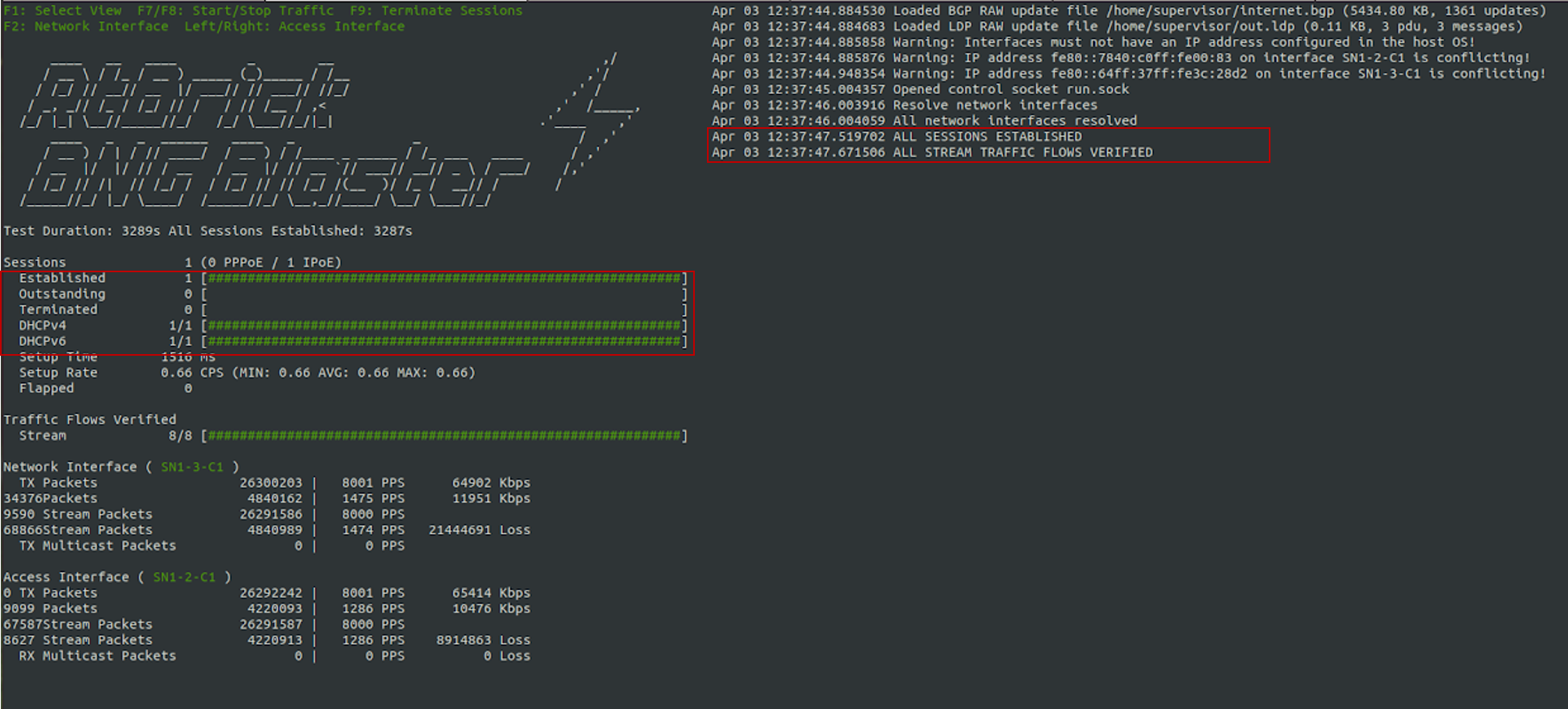
Fig 3: BNG Blaster terminal view
Visit the following URL for more information on BNG Blaster:
Viewing the Subscribers and the Subscriber Details on RBFS
Enter the following command to view the list of subscribers.
supervisor@rtbrick: op> show subscriber
Subscriber-Id           Interface         VLAN       Type    State
216454257090494465      ifp-0/1/23        1001:1001  IPoE    ESTABLISHED
Enter the following command to view the details of the specified subscriber.
supervisor@rtbrick: op> show subscriber 216454257090494465 detail
Subscriber-Id: 216454257090494465
    Type: IPoE
    State: ESTABLISHED
    Created: Sun Aug 23 04:57:37 GMT +0000 2026
    Interface: ifp-0/1/23
    Outer VLAN: 1001 (802.1q)
    Inner VLAN: 1001
    Client MAC: 02:00:00:00:00:01
    Server MAC: 5c:07:58:a2:cb:9a
    IFL: ipoe-0/1/23/216454257090494465
    Username: 02:00:00:00:00:01@ipoe
    Access-Profile: ipoe
    AAA-Profile: aaa-profile
    Service-Profile: qos_service
    Reply-Message: FOOBAR Internet
    Session-Timeout: 0 seconds (disabled)
    Idle-Timeout: 0 seconds (disabled)
    MTU: 1500, Profile: N/A
    IPv4:
        Instance: default
        Address: 203.0.113.1/255.255.255.255
        Address Active: True
        Primary DNS: 203.0.113.200
        Secondary DNS: 203.0.113.201
    IPv6:
        Instance: default
        Prefix: 2001:db8:0:1::1/128
        Prefix Active: True
        Delegated Prefix: 2001:db8:0:3::/64
        Delegated Prefix Active: True
        Primary DNS: 2001:db8:0:20::1
        Secondary DNS: 2001:db8:0:20::2
    Accounting:
        Session-Id: 216454257090494465:1787461057
        Start-Time: 2026-08-23T04:57:37.572297+0000
        Interims Interval: 120 seconds
Pinging the Subscriber (source: IPOE) from Multiservice Edge
Before pinging a subscriber, use the show route <…> command to display the subscriber IPs at the Multiservice Edge.
supervisor@rtbrick: op> show route ipv4 unicast source ipoe
Flags: & - Imported
Instance: default, AFI: ipv4, SAFI: unicast
Flags  Prefix/Label                                Source               Pref  Next Hop                                    Outgoing Interface
       203.0.113.1/32                              ipoe                    7  -                                           ipoe-0/1/23/216454257090494465
From the above list, ping 203.0.113.1 as shown below.
supervisor@rtbrick>multiservice-edge.rtbrick.net: cfg> ping 203.0.113.1
68 bytes from 203.0.113.1: icmp_seq=1 ttl=64 time=1.3463 ms
68 bytes from 203.0.113.1: icmp_seq=2 ttl=64 time=10.5234 ms
68 bytes from 203.0.113.1: icmp_seq=3 ttl=64 time=9.8053 ms
68 bytes from 203.0.113.1: icmp_seq=4 ttl=64 time=11.0041 ms
68 bytes from 203.0.113.1: icmp_seq=5 ttl=64 time=10.9300 ms
Statistics: 5 sent, 5 received, 0% packet loss
supervisor@rtbrick>multiservice-edge.rtbrick.net: cfg>
Validating Traffic Streams
Traffic streams can be used to perform various forwarding verifications.
For upstream traffic capture, enter the following command:
capture interface ifp-0/1/23 direction inFor downstream traffic capture, enter the following command:
capture interface ifp-0/1/23 direction outHere, ifp-0/1/23 refers to the access interface.
Validating the IPoE QoS on BNG Blaster
To validate the IPoE QoS on BNG Blaster, switch to the Service Node. Navigate to the Streams and Session Traffic terminal by pressing F1 function key in your keyboard.
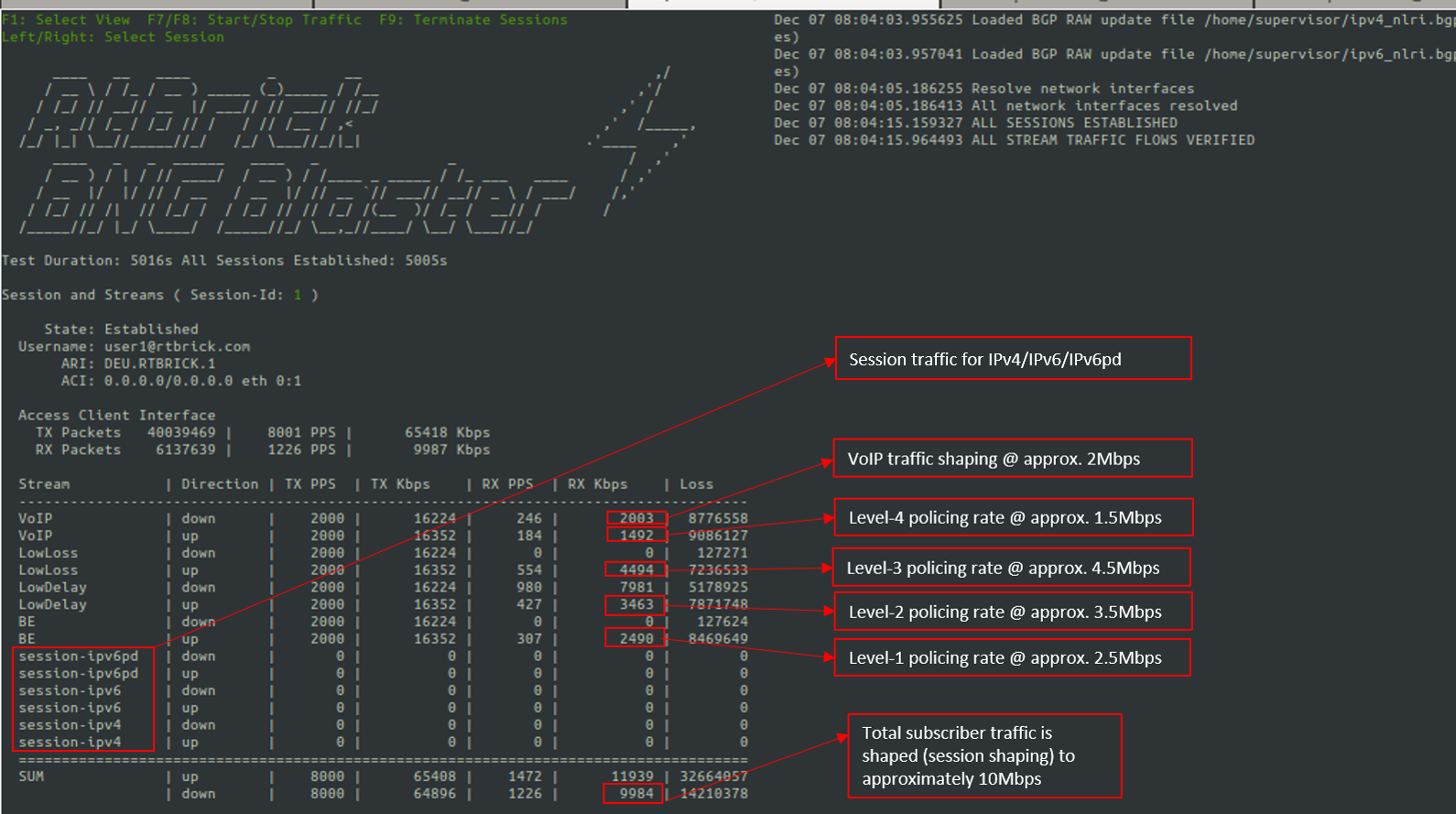
As shown in the above image, the VoIP downstream traffic has been shaped (session shaping) to 2Mbps. Similarly, the total subscriber traffic has been shaped approximately to 10Mbps.
Following are the upstream traffic rates of different policer levels:
-
Level-1 Rates ~=2.5Mbps
-
Level-2 Rates ~=3.5Mbps
-
Level-3 Rates ~=4.5Mbps
-
Level-4 Rates ~=1.5Mbps
IPoE Subscriber Accounting for Upstream and Downstream Traffic
Run the "show subscriber" command to view the list of subscribers.
supervisor@rtbrick: op> show subscriber
Subscriber-Id           Interface         VLAN       Type    State
216454257090494465      ifp-0/1/23        1001:1001  IPoE    ESTABLISHED
Specify the Subscriber-ID to find the specific subscriber’s accounting details:
supervisor@rtbrick: op> show subscriber 216454257090494465 accounting
Subscriber-Id: 216454257090494465
    IFL: ipoe-0/1/23/216454257090494465
    Start Timestamp: Sun Aug 23 04:57:37 GMT +0000 2026
    Idle Timestamp: Sun Aug 23 04:59:57 GMT +0000 2026
    Session-Timeout: 0 seconds
    Idle-Timeout: 0 seconds
    Session Statistics:
        Ingress: 171957 packets 172644828 bytes
        Egress: 144065 packets 147234430 bytes
    IFL Statistics:
        Ingress: 0 packets 0 bytes
        Egress: 0 packets 0 bytes
    Egress Class (Queue) Statistics:
        class-0: 4 packets 4088 bytes dropped: 154202 packets 157594444 bytes
        class-1: 115244 packets 117779368 bytes dropped: 118863 packets 121477986 bytes
        class-2: 4 packets 4088 bytes dropped: 100845 packets 103063590 bytes
        class-3: 28813 packets 29446886 bytes dropped: 205534 packets 210055748 bytes
        class-4: 0 packets 0 bytes dropped: 0 packets 0 bytes
        class-5: 0 packets 0 bytes dropped: 0 packets 0 bytes
        class-6: 0 packets 0 bytes dropped: 0 packets 0 bytes
        class-7: 0 packets 0 bytes dropped: 0 packets 0 bytes
    Ingress Policer Statistics:
        Level 1: 34511 packets 34649044 bytes dropped: 245323 packets 246304292 bytes
        Level 2: 51213 packets 51417852 bytes dropped: 228573 packets 229487292 bytes
        Level 3: 68978 packets 69253912 bytes dropped: 210782 packets 211625128 bytes
        Level 4: 17255 packets 17324020 bytes dropped: 262581 packets 263631324 bytes